ANT Radio Service is a wireless communication component found on certain Android phones and tablets, including older Samsung Galaxy and Sony Xperia models. It enables compatible applications to exchange data with ANT+ accessories such as heart-rate monitors, cycling sensors, and fitness equipment.
You can discover ANT Radio Service under Settings > Apps even if you never installed it or connected a fitness accessory. Its unfamiliar name raises questions about why it is there, whether it is safe, and whether removing it will affect your phone.
What Is ANT Radio Service and What Does It Do?
ANT Radio Service enables Android applications to communicate through ANT, a low-power wireless protocol operating in the 2.4 GHz frequency band. Despite its name, the service has nothing to do with listening to AM or FM radio stations.
ANT+ is widely used in sports and fitness equipment. A compatible heart-rate strap sends measurements to a training application, while cycling sensors transmit speed, cadence, or power readings during a workout. ANT communication also supports applications beyond fitness, including industrial and commercial devices.
Its Android package name is com.dsi.ant.service.socket. An examination of version 4.18.00 confirms that the APK contains a service named com.dsi.ant.service.AntRadioService but no standard launcher activity. This explains why it functions as a background component rather than an application you open from the home screen.
Installing the software alone does not give a phone ANT+ hardware capability. Devices without an integrated ANT radio require a compatible external adapter and supporting software, as documented in the official ANT Radio Service project.
Do I Need ANT Radio Service on My Phone?
You do not need ANT Radio Service for ordinary phone functions, including calls, text messages, mobile data, Wi-Fi, or standard Bluetooth connections. It is required when an application communicates with an ANT+ accessory, not when a smartwatch or fitness tracker connects exclusively through Bluetooth.
Some devices also include other ANT-related components, such as ANT+ Plugins Service, identified by com.dsi.ant.plugins.antplus, which helps applications connect to supported accessories and interpret their measurements. ANT USB Service supports external ANT USB adapters, while ANT+ Plugin Manager Launcher provides controls for managing saved ANT+ devices and their settings.
Is ANT Radio Service Safe? Does It Drain Battery?
The official ANT Radio Service is legitimate software, not spyware or a virus. It is developed by ANT Wireless, a division of Garmin Canada Inc. The developer states that ANT Radio Service and ANT+ Plugins Service do not collect personal data.
According to ANT Wireless, the service does not run or consume system resources unless an application requires ANT communication. Actual battery consumption depends on application activity and hardware communication. If you suspect unusual battery consumption, open Settings > Battery > Battery usage to examine the reported activity.
How to Disable or Uninstall ANT Radio Service
If you do not use ANT-enabled accessories, disabling ANT Radio Service is an appropriate way to deactivate its functionality without removing manufacturer-installed software. The developer’s official guidance confirms that disabling the service does not interfere with normal phone operation, although applications that depend on ANT connectivity will lose access to it.
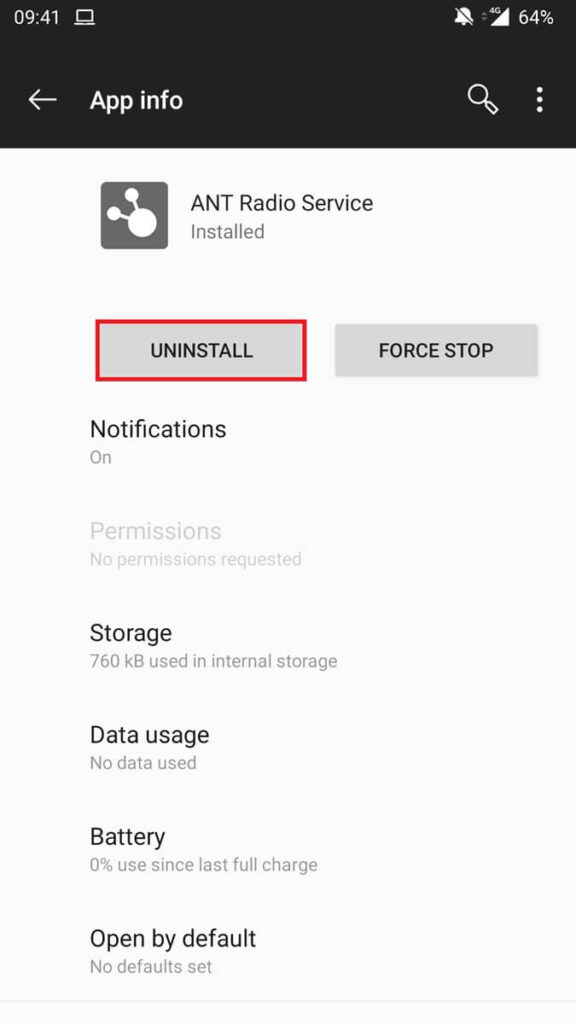
The available controls depend on how the service was installed and how the manufacturer configured Android. Preinstalled copies generally provide a Disable option rather than full removal, while separately installed copies can offer Uninstall.
- Open Settings > Apps on your Android phone.
- Find ANT Radio Service in the application list. If it is hidden, open the Apps menu or filter and enable Show system apps.
- Open its app information screen and select Disable if that option is available, and confirm the action.
- If Android provides Uninstall instead, select it to remove the application.
Disabling the service is reversible. If you later connect an ANT+ accessory, return to the same app information screen and select Enable, or reinstall a previously removed user-installed copy through Google Play.