OsuLogin is an Android system app that can appear in the installed apps list even though you have never opened or downloaded it. Its name offers little explanation, and the word “login” can make it look like an unfamiliar account service running on your phone.
It is a legitimate component used to register devices with certain Passpoint Wi-Fi networks, not a separate account service or spyware. Most users never need to interact with it, and removing it is unnecessary.
What Is OsuLogin on Android?
OsuLogin is a system application associated with Passpoint, also known as Hotspot 2.0, a Wi-Fi technology that allows devices to discover and authenticate with participating networks. OSU stands for Online Sign-Up, a registration method that allows devices to obtain the credentials and configuration needed to access a Passpoint service provider’s network.
Android introduced support for Passpoint R2 Online Sign-Up in Android 10, building on earlier Passpoint support. OsuLogin provides the registration interface and works with Android’s Wi-Fi framework to complete the setup of a Passpoint profile.
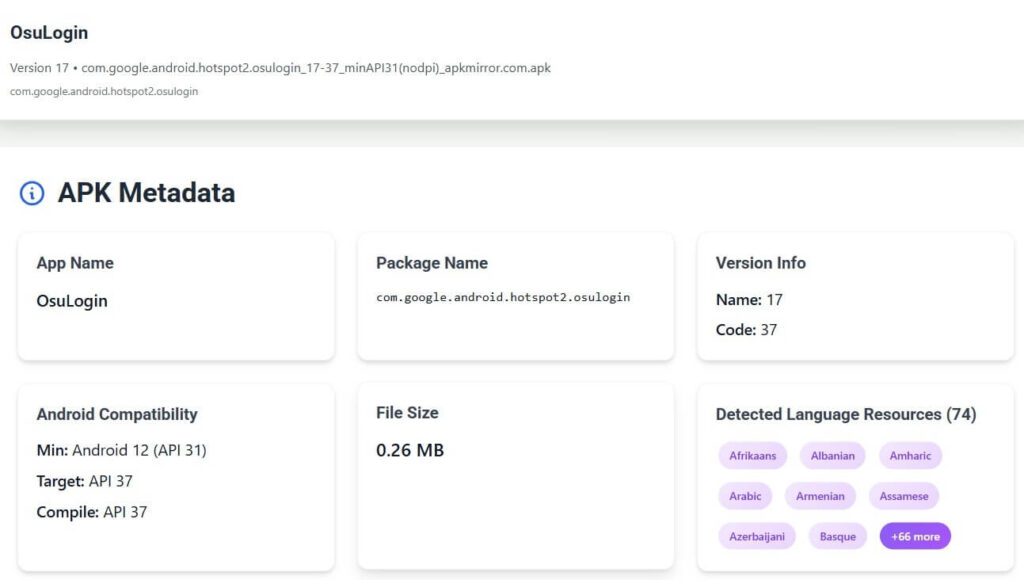
On Google Pixel devices, the application uses the package name com.google.android.hotspot2.osulogin. The Android Open Source Project (AOSP) implementation uses com.android.hotspot2.osulogin, with both identifiers representing the same type of system functionality.
How Does OsuLogin Work?
Passpoint allows a device with an appropriate network profile to connect automatically to compatible Wi-Fi hotspots without repeatedly entering login credentials. The profile contains the information Android needs to recognize participating networks and authenticate with the service provider.
When Android detects a network offering Passpoint Online Sign-Up, it can display the available providers in the Wi-Fi selection screen. Selecting a provider starts the registration process, and OsuLogin presents the interface needed to complete enrollment.
After successful registration, Android installs the resulting Passpoint profile and handles subsequent network discovery and authentication through its Wi-Fi framework. OsuLogin does not need to run continuously to maintain those connections. Android’s Captive Portal Login handles a different task: displaying web-based sign-in pages on Wi-Fi networks that require them.
Why Is It Installed on My Phone?
OsuLogin is included in system software on supported devices to provide the Online Sign-Up interface when needed. It normally has no separate launcher icon, so users generally discover it when displaying system applications, checking installed packages, or examining technical information about their phones.
The Wi-Fi Alliance deprecated Online Sign-Up on June 30, 2023, but the decision did not discontinue Passpoint itself. Android continues to support Passpoint, and the OsuLogin component is still present in some system builds despite the deprecation of its enrollment method. Its installation identifies a system capability, not an active network subscription or connection.
Is OsuLogin Safe?
OsuLogin has a documented networking purpose, and its implementation is available in Google’s Android source code. Its presence among installed system applications is not evidence of malware or unauthorized account activity.
We used our APK Analyzer to examine the OsuLogin version 17 APK (com.google.android.hotspot2.osulogin), including its declared permissions and Android components, without installing it on a device. The APK requests permissions to check network connectivity, modify Wi-Fi configuration, and access the internet. It also defines and requests an application-specific permission associated with broadcast receiver handling, bringing the declared permission set to four. None is classified as a dangerous Android runtime permission.
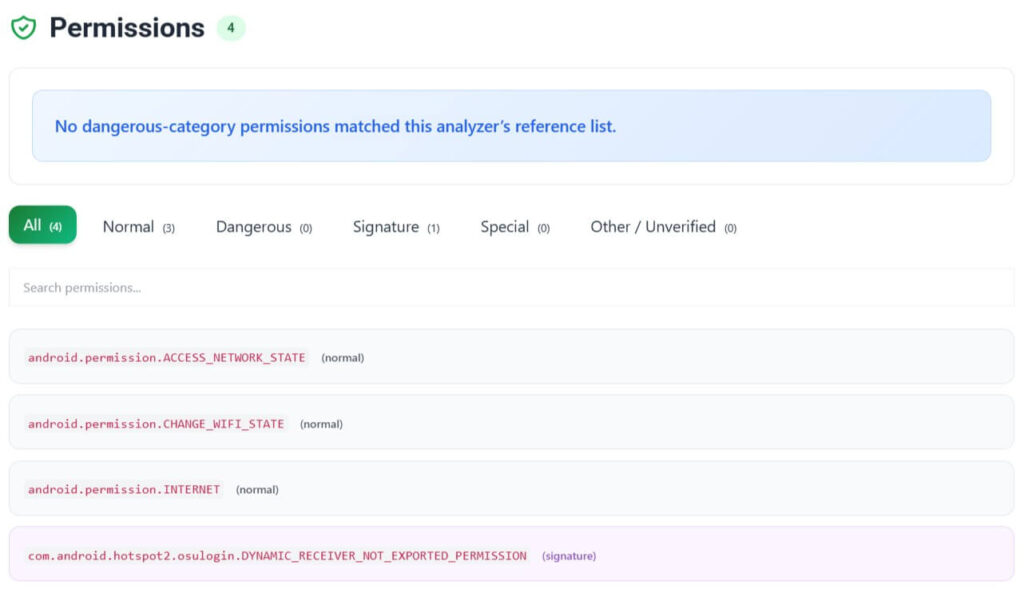
The examined APK has no declared background service, and its main OsuLogin activity is not exported for direct launching by other applications. Our APK Analyzer reported no matches against its static security rules, a result that does not assess the application’s behavior while running on a phone.
Its declared permissions do not grant direct access to contacts, messages, the camera, or microphone. The networking permissions support its role in Passpoint registration.
Can You Delete or Disable OsuLogin?
OsuLogin is a system application, so uninstall and disable controls depend on the device’s software configuration. You can inspect its available controls under Settings > Apps, after enabling the display of system apps where that option exists. Some devices do not provide a Disable button, or display it as unavailable.
Disabling or removing OsuLogin prevents its registration interface from functioning when a compatible Passpoint provider requires Online Sign-Up. Ordinary home Wi-Fi connections do not depend on OsuLogin, and Android’s Wi-Fi framework handles authentication for existing Passpoint profiles.
Removing the application offers no established battery-life or meaningful storage-management benefit. It is also not a solution for general Wi-Fi failures, mobile data disconnections, or slow internet speeds, which involve different networking components and conditions.
On a Google Pixel, open Settings > Network & internet > Internet to review the available Wi-Fi networks and saved connections. Google’s Pixel Wi-Fi instructions explain how to manage saved networks. The available controls differ between Android versions and manufacturers, and the network list does not necessarily identify every provisioned Passpoint subscription.
Conclusion
OsuLogin does not need to be removed simply because it appears among installed system apps. Unless you have a specific problem involving Passpoint enrollment, leaving the component installed preserves its function without affecting how you normally use Wi-Fi.