
WhatsApp does not offer a setting to stop messages from a specific person without blocking them. Muting or archiving a conversation can keep unwanted messages out of sight, but the messages will still arrive.
How to Stop Receiving Messages on WhatsApp Without Blocking
1. Use the “Archive” Feature
Archiving a WhatsApp conversation removes it from your main chat list without deleting messages or notifying the sender. Under Settings > Chats, enable Keep chats archived to prevent new messages from returning the conversation to your main chat list. Archived conversations also remain silent unless someone mentions you or replies to you.
To archive a conversation on Android, long-press the chat and tap the Archive icon. On an iPhone, swipe left on the conversation and select Archive.
You can find the conversation in Archived whenever you want to read or restore it. Archived chats can still display unread message counts.

2. Mute WhatsApp Notifications
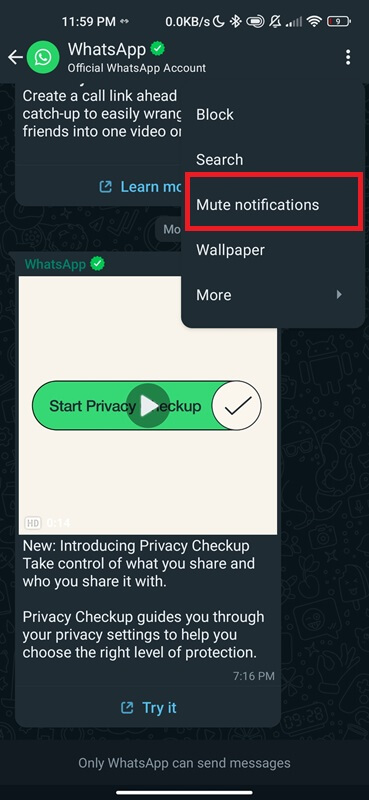
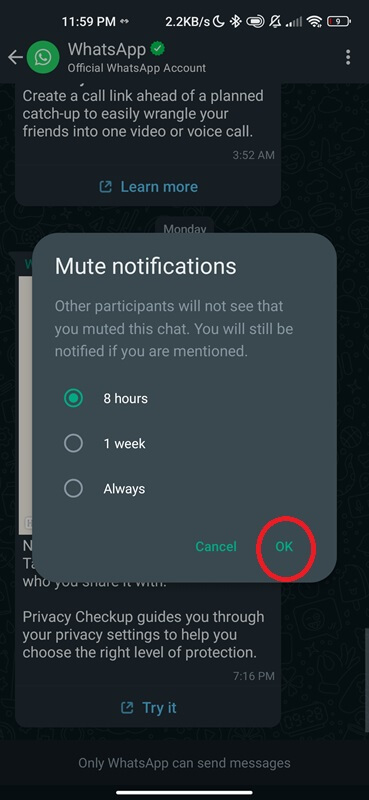
Muting a WhatsApp conversation stops ordinary message alerts from that chat without blocking the sender. WhatsApp does not notify the other person that you have muted the conversation.
- Open WhatsApp and select the conversation you want to mute.
- Tap the contact or group name at the top of the screen.
- Select Mute notifications.
- Choose 8 hours, 1 week, or Always, depending on how long you want the alerts silenced.
3. Block Messages From Unknown Numbers
WhatsApp includes a setting that blocks unusually high volumes of messages from unknown accounts without requiring you to block each sender individually. To enable it, open WhatsApp > Settings > Privacy > Advanced and turn on Block unknown account messages.
This protection does not stop every unfamiliar number from messaging you. Your existing contacts can continue communicating normally.
Conclusion
For an individual contact, muting and archiving are the practical alternatives to blocking. If unwanted messages come from multiple unknown numbers, WhatsApp’s advanced message-blocking setting provides additional protection.
More helpful articles: