NativeDropBoxAgent is a preinstalled Motorola system component associated with Android’s diagnostic logging system. Its package name is com.motorola.android.nativedropboxagent, and despite the name, it has no connection to Dropbox, the cloud storage service.
Motorola users often discover NativeDropBoxAgent in Settings without remembering installing it. Unlike ordinary apps, it operates in the background without a screen to open, raising questions about its purpose, battery usage, security, and whether it can be removed.
What Does NativeDropBoxAgent Do?
NativeDropBoxAgent is designed to support Motorola’s system diagnostic functions. Android includes a service called DropBoxManager, which stores diagnostic records such as application crashes and kernel logs. These records preserve information about system failures that diagnostic tools and authorized services can examine.
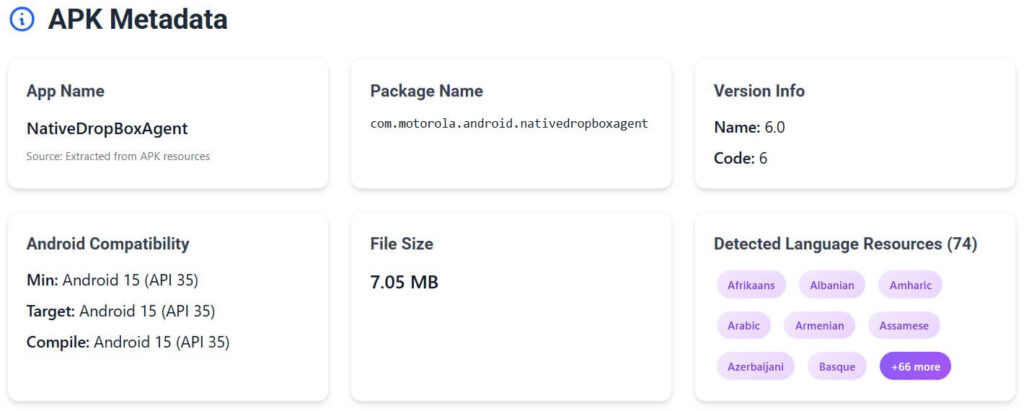
Our APK analysis of the NativeDropBoxAgent 6.0 for Android 15 reveals how the component is configured. It declares the shared user ID android.uid.log, which associates it with Android’s logging identity, and requests the protected android.permission.DIAGNOSTIC permission. These settings establish its intended integration with Android’s privileged diagnostic infrastructure.
The APK also contains a receiver for Android’s BOOT_COMPLETED broadcast, which allows the component to respond when the phone finishes starting. It declares a background service named NativeDropBoxAgent and requests persistent process management intended for certain system applications. This configuration supports background system operations without requiring manual interaction.
Android’s DropBoxManager stores diagnostic entries locally rather than transmitting them automatically. Other authorized system services can retrieve and process those records, including for diagnostic reporting. The exact records handled by Motorola’s NativeDropBoxAgent are not publicly documented.
Is NativeDropBoxAgent Safe?
Yes. NativeDropBoxAgent is a legitimate Motorola system component, and finding it on a Motorola phone is not a sign of malware or spyware. The examined APK contains Motorola-attributed signing certificate information, and its package name matches the component found in Motorola system software.
The Android 15 APK declares three permissions: RECEIVE_BOOT_COMPLETED, DIAGNOSTIC, and a package-specific permission for protecting dynamically registered broadcast receivers. None requires the user approval associated with dangerous runtime permissions such as camera or location access. Android’s App info screen can therefore display “No permissions requested” despite these manifest declarations.
The APK does not request android.permission.INTERNET, which ordinary Android applications need for direct network access. However, NativeDropBoxAgent declares a shared system logging UID, so its own permission list does not fully describe the permissions available to that shared identity. The absence of an INTERNET declaration is relevant to concerns about mobile data usage, but it does not establish the component’s actual network activity.
The application’s main service and boot receiver are not exported, restricting direct access from ordinary third-party applications.
Can NativeDropBoxAgent Drain Battery or Use Mobile Data?
NativeDropBoxAgent is not an established cause of excessive battery drain or mobile data consumption. Older online discussions have blamed it for charging problems, unexpected shutdowns, and poor performance, but those reports lack diagnostic evidence connecting the symptoms to the component.
System diagnostic operations consume processing resources when they run, particularly when Android records repeated failures. The APK’s persistent configuration concerns system-level process management, not a measured rate of battery consumption.
On Motorola phones, Settings > Battery > Battery usage provides a breakdown of recorded power consumption. For cellular traffic, open Settings > Network & internet > Mobile network, select your SIM if prompted, then tap App data usage (menu names vary by model and Android version). Check which apps or system categories account for the highest usage before attributing the problem to NativeDropBoxAgent.
Android does not display every system process separately in battery or network statistics. If NativeDropBoxAgent is absent from those lists, its individual consumption cannot be measured from those screens.
Can You Disable or Remove NativeDropBoxAgent?
The best choice is to leave NativeDropBoxAgent enabled. It is part of Motorola’s diagnostic software, and removing a system component without identifying a specific problem offers no established performance or battery benefit.
NativeDropBoxAgent is not managed like an ordinary application downloaded from Google Play. Motorola’s firmware determines whether the component can be disabled, and many preinstalled system packages have no standard Uninstall option. Removing it would also remove its installed diagnostic functionality.
Android provides different controls for managing installed applications. Force stop temporarily stops an app’s process, but Android can start it again when needed. Disable, when available, prevents the app from operating normally until the user enables it again.
How to Check NativeDropBoxAgent in Settings
You can inspect NativeDropBoxAgent through Motorola’s application settings without modifying the system. The following steps help identify its installed status and available management controls, which also differ by model and Android version.
- Open Settings > Apps > See all apps.
- Select Show system apps from the menu.
- Find NativeDropBoxAgent and open its App info screen.
- Review the available Force stop, Disable, or Uninstall controls without changing them.
Conclusion
NativeDropBoxAgent’s presence is normal on Motorola devices that include the package. When a phone develops battery, network, or stability problems, identifying the actual source through device diagnostics is more useful than disabling an unfamiliar system component.